I recently worked on a serverless application where warm API requests from Pakistan were taking around 700 ms. The stack was AWS Lambda behind CloudFront, Lambda@Edge and a Lambda Function URL, with PostgreSQL on Neon.
The admin dashboard made the problem obvious. It fires around 14 API calls in parallel, so every page load paid that 700 ms, and the page wasn’t ready until the slowest call came back.
I could have reached straight for more infrastructure or put caching everywhere. Before that I wanted an answer to one question: where were those 700 ms actually going?
The legacy flow
Every API request took this path:
Client → CloudFront → Lambda@Edge → Lambda Function URL → AWS Lambda → Neon PostgreSQL
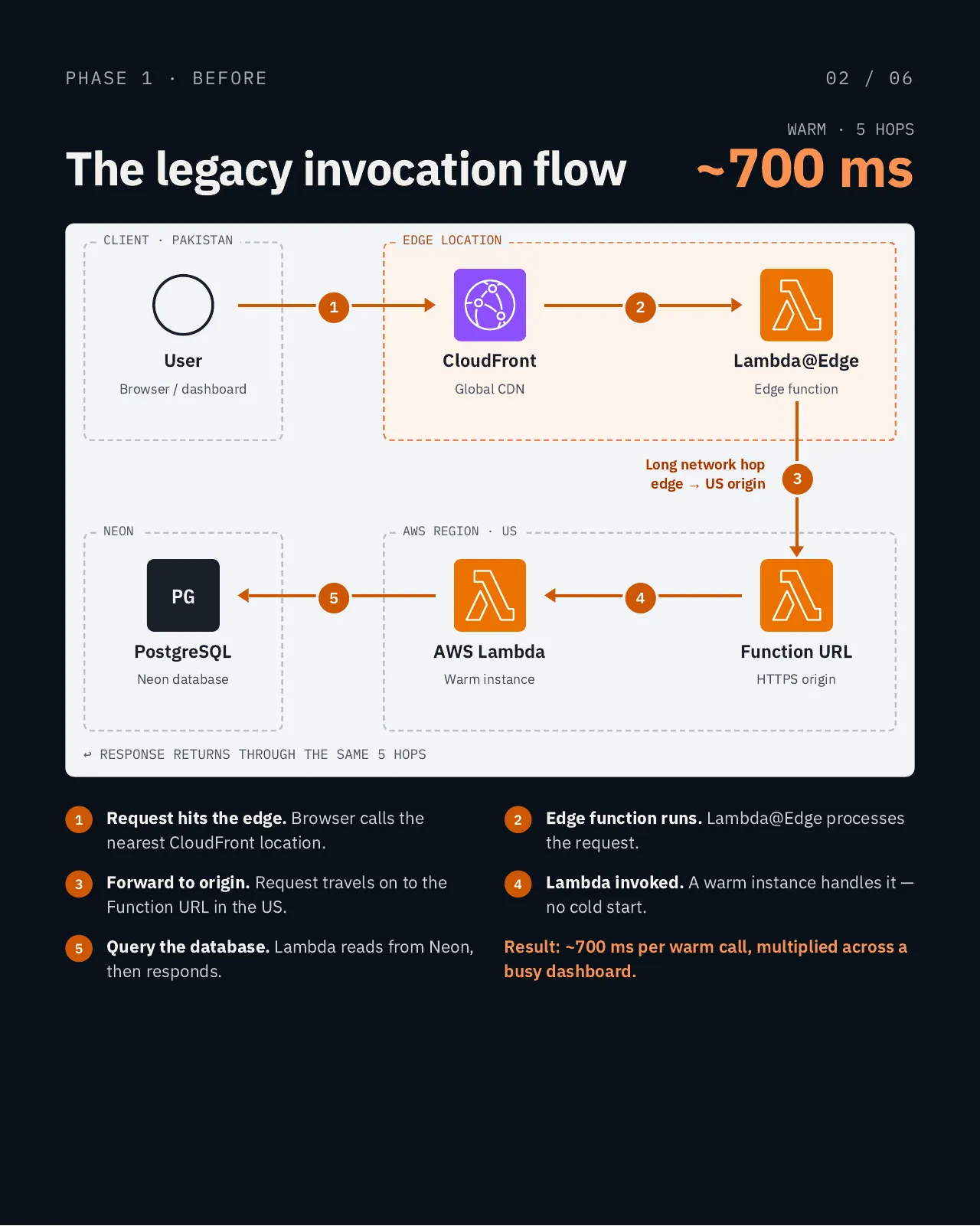
The obvious suspects didn’t hold up:
- Cold starts. The Lambda instances were already warm, so they weren’t behind the baseline latency.
- Lambda@Edge. It was surprisingly light, with a median execution time of about 1.5 ms.
- The database. Neon query latency wasn’t where the time was going either.
That left the network itself, specifically the hop between the CloudFront edge and the regional origin in the US.
Using AI as an engineering partner
This is where AI was useful. I didn’t ask it to generate code; I used it to challenge the architecture:
- What happens to latency when the client is geographically far from the Lambda region?
- Is CloudFront actually helping this API workload?
- What are the trade-offs of moving to an API Gateway HTTP API?
- How would connection reuse affect warm requests?
- What happens to authentication, CORS, client IP handling and webhooks?
- How can the migration go in without disrupting production?
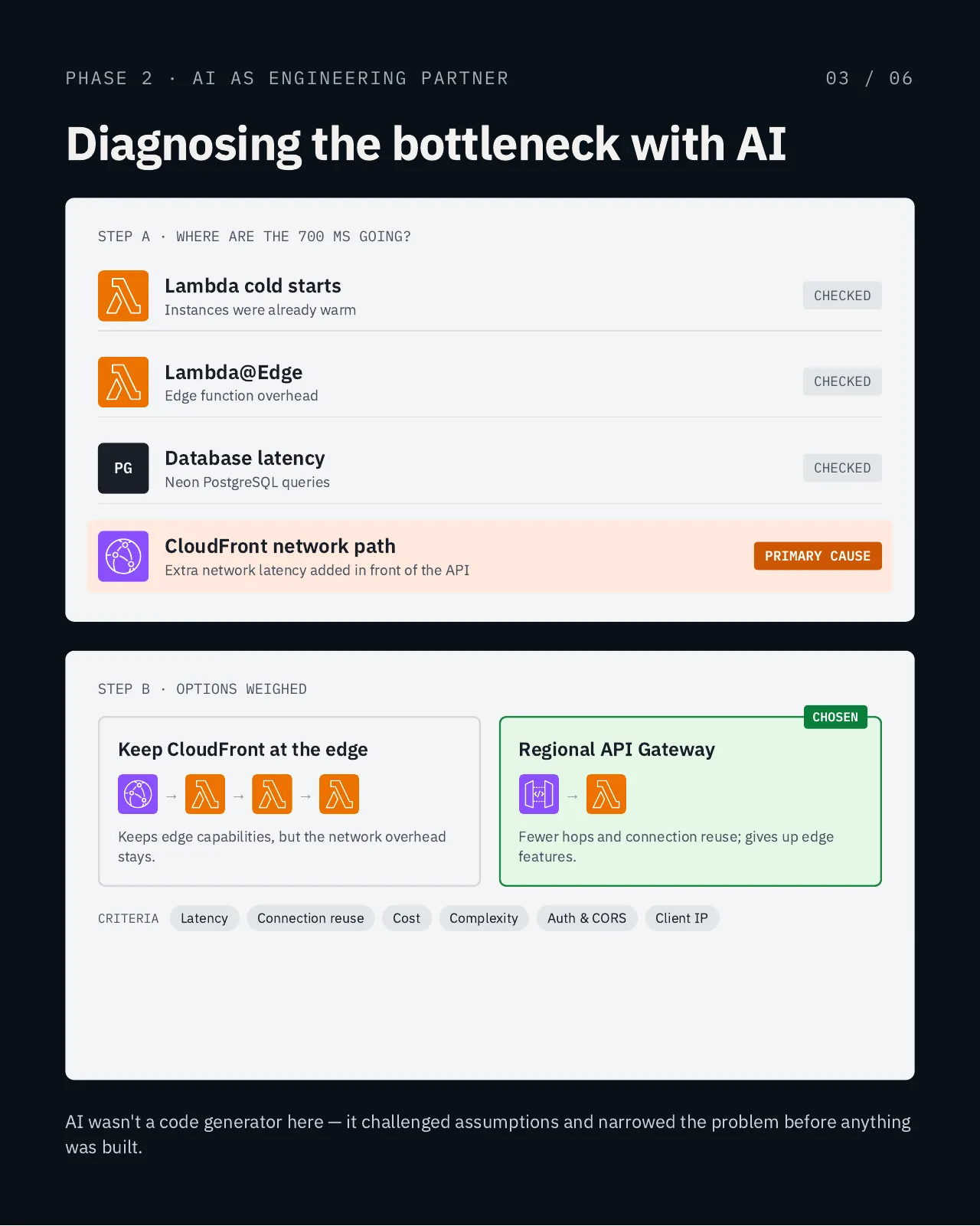
We compared the options on latency, connection reuse, cost, complexity, authentication, CORS and client IP handling. Keeping CloudFront in front of the API kept the edge features, but the network overhead stayed with it. A regional API Gateway HTTP API → Lambda path meant fewer hops and reused connections, at the cost of those edge features. That’s the one I tested.
The optimized flow
The new request path:
Client → API Gateway HTTP API → AWS Lambda → Neon PostgreSQL
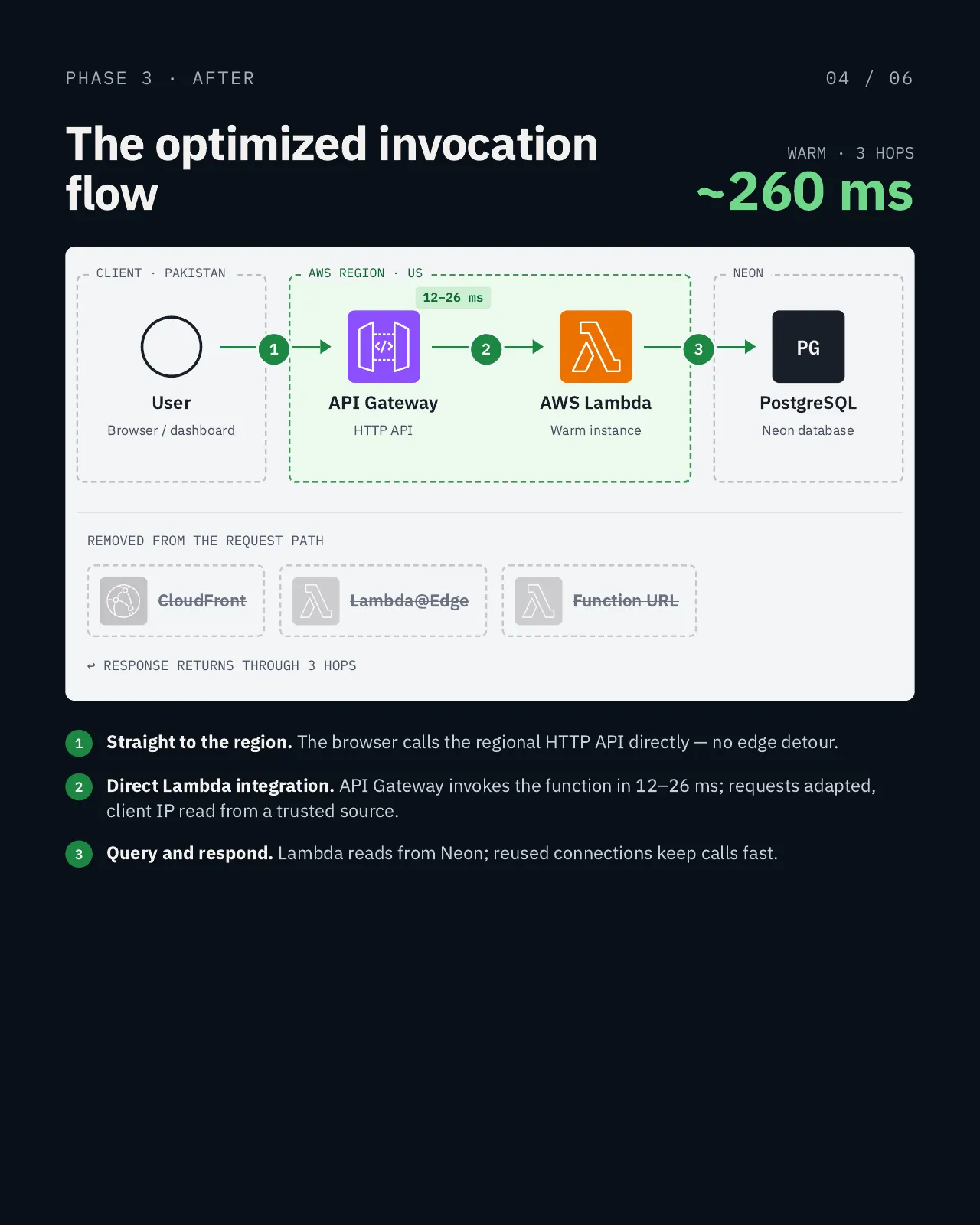
CloudFront, Lambda@Edge and the Function URL are all gone from the API request path. In my measurements, the API Gateway → Lambda integration itself took only 12–26 ms. Requests needed some adapting along the way, and the client IP is now read from a trusted source.
Adding API Gateway wasn’t the important part. Removing a network path this API didn’t need was.
Rolling out without gambling with production
I didn’t switch everything at once. The migration went in step by step:
- Add API Gateway alongside the existing setup, without touching the CloudFront path.
- Configure SST stages and DNS, sequencing deploys so no DNS record is ever deleted.
- Validate behavior: authentication, CORS, webhooks, client IP handling and the main application flows.
- Move development traffic, but only once validation passed.
- Keep production isolated until the new path was proven, with a rollback planned.
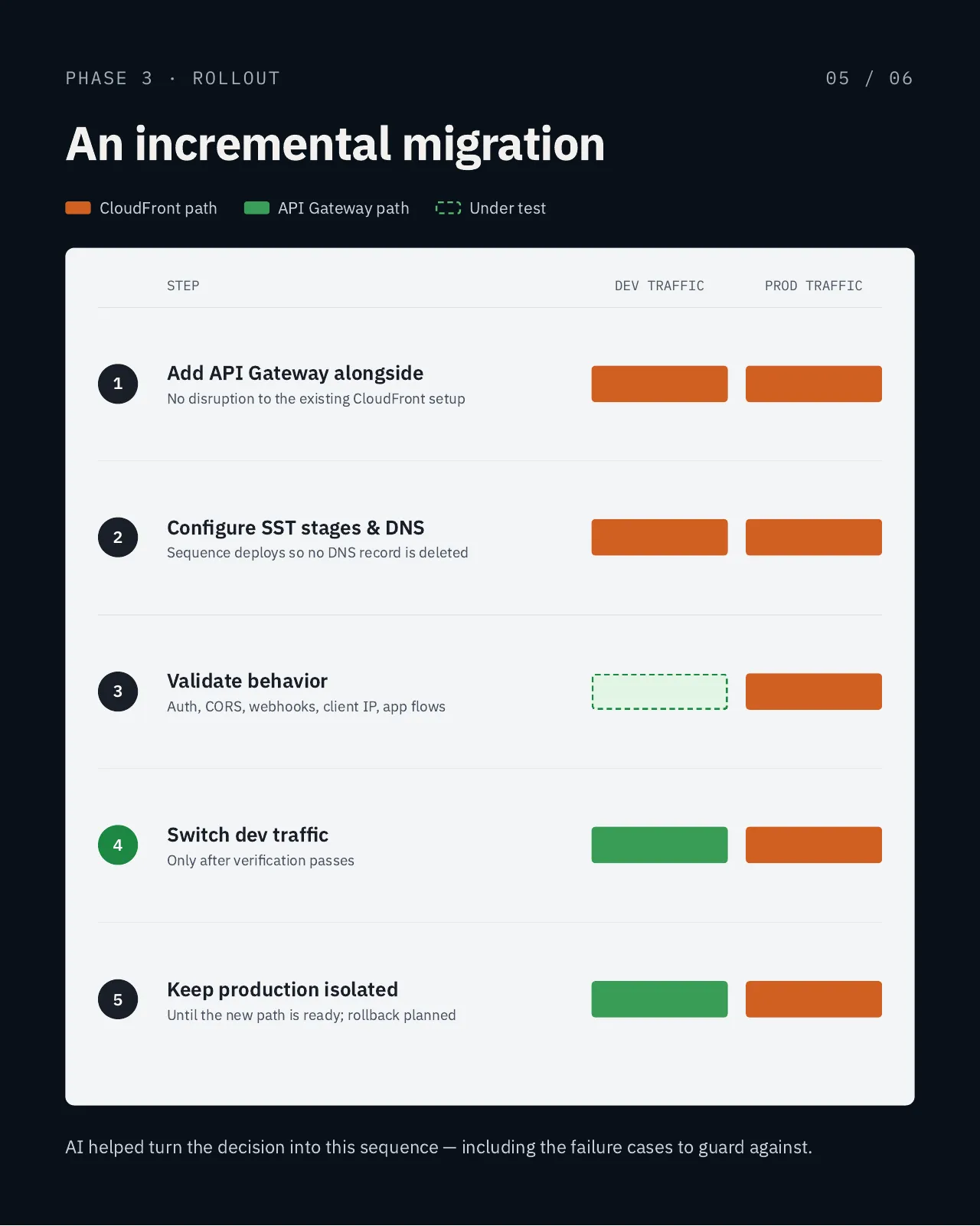
Because the old path stayed in place the whole time, there was always a clean way back if anything unexpected showed up.
The result
- Before: ~700 ms per warm request
- After: ~260 ms per warm request
- Reduction: ~63%
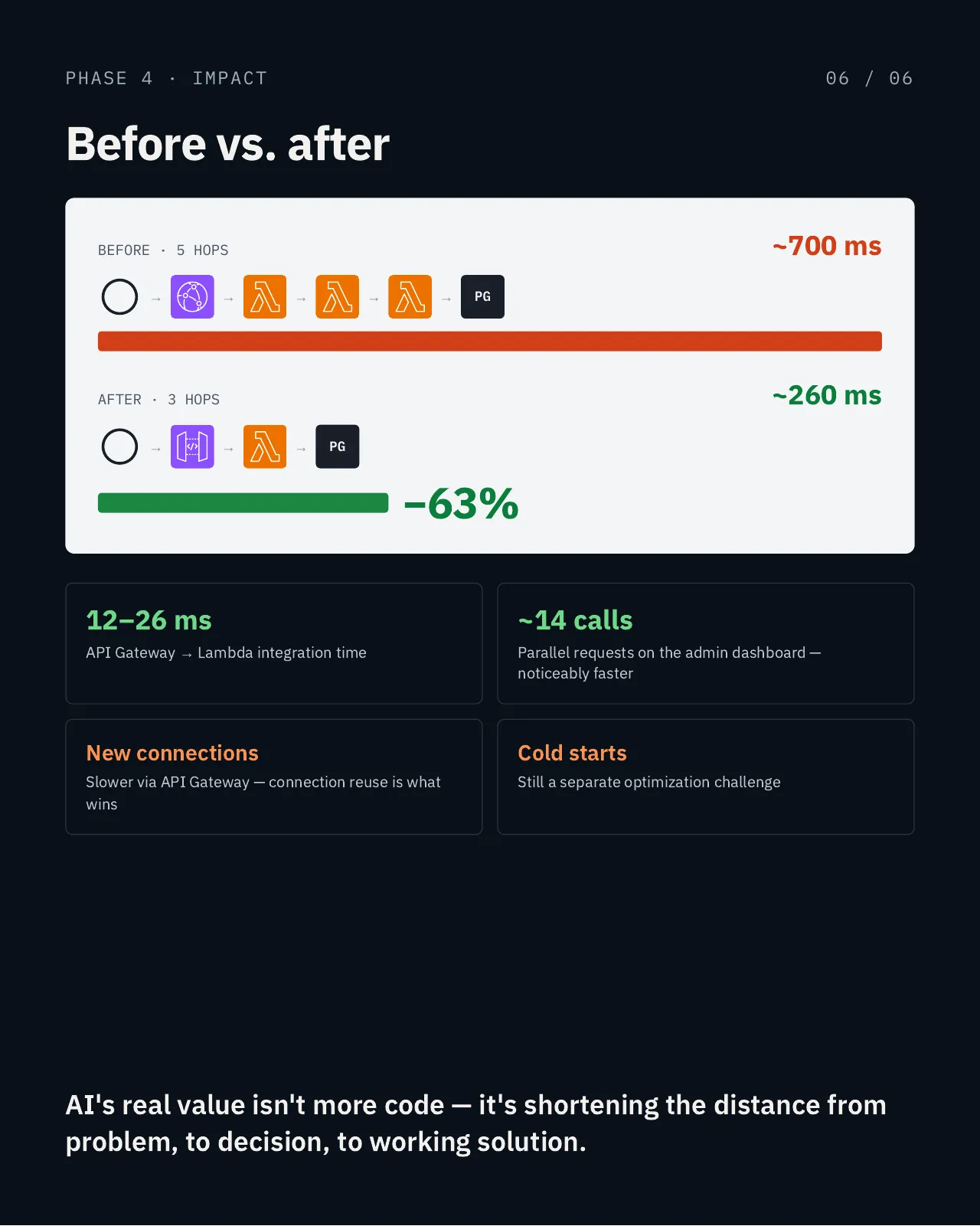
The admin dashboard is where the difference shows most, because it makes so many requests in parallel.
There are trade-offs. New connections can be slower, because the request now goes straight to the AWS region instead of terminating at a nearby CloudFront edge. The gain comes from reusing connections. Cold starts are untouched and remain a separate optimization problem.
So this isn’t a case of one AWS service being better than another. It’s about matching the architecture to the workload, then measuring the result.
What I learned
The biggest lesson wasn’t about CloudFront or API Gateway. It was about how I used AI.
AI didn’t make the architectural decision for me. It helped me:
- question assumptions
- explore alternatives
- identify potential failure cases
- structure the migration
- validate the implementation
- get from investigation to a working solution faster
That’s where I see AI becoming genuinely valuable in software engineering. Not just “write this code”, but “help me reason through this system”.
The goal isn’t to add more technology. It’s to understand the system well enough to know what should be removed, what should stay, and what actually needs to change.